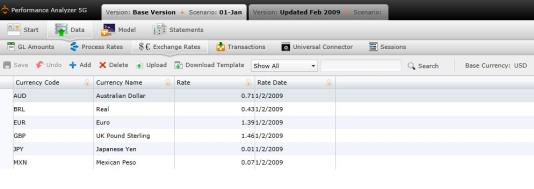
Exchange rates are an important factor for determining model calculation. You can have multiple exchange rates in your model, however, only one exchange rate can be used as a base rate. The base exchange rate should be assigned to the rate that is the most frequently represented rate in the model.
To manage exchange rates, select the Exchange Rates tab under the Data tab.
To add an exchange rate manually:
Select  . A new row will appear in the table.
Type the new exchange rate and its data inside the fields.
The Exchange Rates table contains the following columns:
Currency Code: Name of the process for which the rate is applied.
Currency Name: The facility that is associated with the process.
Rate: Rate applied to the process.
Rate Date: Date and time the rate was added to the application.
To upload files:
Select  . A download pop-up screen will appear. Make your selections and select "OK."
Open the data template and confirm that the columns and the presentation of data is identical to your records.
Select  . The "Upload" panel will open.
Drag and drop files to the grayed area, or select "Browse Upload."
Select  .
.
What if the records fail to upload?See Edit Failed Records.
Select  at any time to delete any changes you have made. Select
  to delete an entire exchange rate.
See also: